StrideMon
Join waitlist

Help • Founding Pass • The app

Help

Everything from “what is this?” to your first walk, in plain words. Stuck on a message? Find it under “When something goes wrong”, or write to us.

How it works

  1. 01

    Preview

    Browse all 1,000 Founding Passes, heart your favourites, and join the waitlist.

  2. 02

    Waitlist window

    For 48 hours, people who joined the waitlist before it opened mint first. One free pass each.

  3. 03

    Open mint

    Then anyone can mint what’s left, until all 1,000 are minted.

  4. 04

    The app

    Sign in to the StrideMon app with the wallet that holds your pass. You get a Founder Sneaker in your pass’s design, and your first walk laces both.

  5. 05

    Open to all

    When all 1,000 are minted, or on the last date in the schedule, anyone can play with a free Sneaker. No new passes, ever.

Before you start

  • An Android phone. The app is Android only for now. iOS comes later.
  • MetaMask, a free wallet app. Your wallet is your StrideMon account.
  • Monad Testnet turned on in MetaMask. It’s free, and it takes one tap below on a laptop.
  • An email address, to check it’s you when you mint.
  • The StrideMon app, once you’ve minted.

You don’t need any money. Minting is free, and there’s no gas to pay: StrideMon pays it.

Guides

Install MetaMask

MetaMask is a free wallet app. It holds your pass and your Sneaker, and it’s how you sign in.

  1. 1.On your Android phone, open Google Play and install MetaMask (by Consensys). On a laptop, add the MetaMask extension to Chrome, Brave, Firefox or Edge.
  2. 2.Open it and tap Create a new wallet. Choose a password.
  3. 3.Write the Secret Recovery Phrase (12 words) on paper and keep it somewhere safe. It’s the only way back into your wallet if you lose your phone.

Never share your Secret Recovery Phrase. StrideMon will never ask for it, and nobody honest will.
Add Monad Testnet

StrideMon runs on Monad Testnet, a test network. Adding it is free, and the app needs it.

  1. 1.On a laptop with MetaMask, or in MetaMask’s own browser on your phone: tap Add Monad Testnet below, then approve in MetaMask.
  2. 2.Or open MetaMask, tap the network menu at the top, then Add a custom network, and type the details below.
  3. 3.Turn it on before you connect to StrideMon. A wallet only shares your account for networks it has turned on.

The details, to add by hand

Network name
Monad Testnet
RPC URL
https://testnet-rpc.monad.xyz
Chain ID
10143
Currency
MON
Explorer
https://testnet.monadvision.com

Get ready: check your email and sign in

Do this before you mint, so minting is one tap when the time comes.

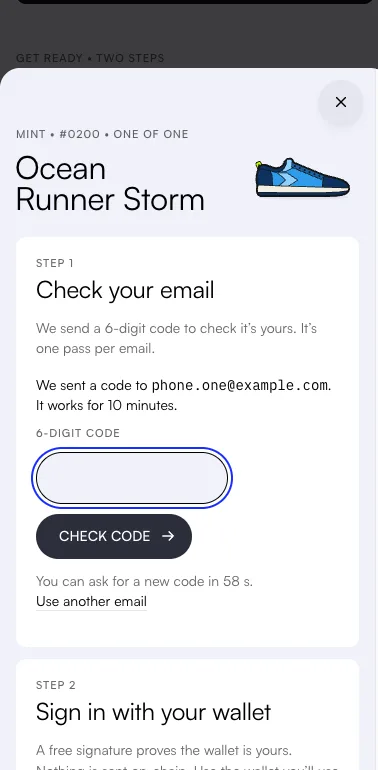
  1. 1.Open stridemon.xyz/pass and find Get ready near the top.
  2. 2.Type your email and tap Send code. If a robot check shows, let it finish.
  3. 3.Type the 6-digit code from our email. It works for 10 minutes. Look in spam if it isn’t in your inbox.
  4. 4.Tap Connect wallet and pick MetaMask. On a phone, MetaMask opens: approve, then come back.
  5. 5.Tap Sign in and approve the message in MetaMask. It’s free and sends nothing.

Use the wallet you’ll use in the app. The email check lasts 6 hours, so do it on the day.

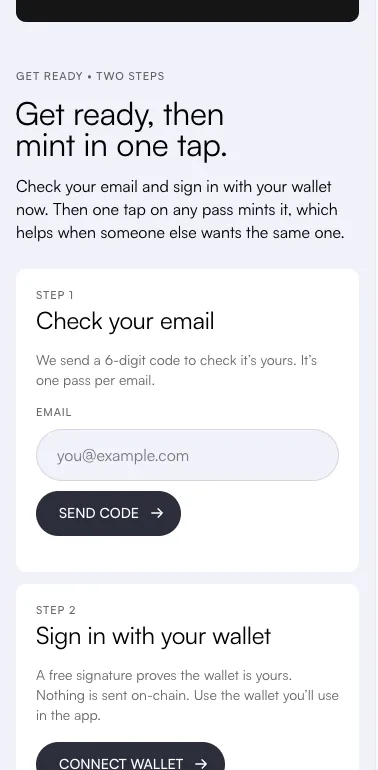
  • Get ready on a phone: Step 1, Check your email, with an email box and a Send code button. Step 2, Sign in with your wallet, with a Connect wallet button.
  • The email step after Send code: “We sent a code to phone.one@example.com. It works for 10 minutes.”, a 6-digit code box and a Check code button.

Mint your pass

  1. 1.Pick a pass: browse the gallery, take the quiz, or tap Surprise me. Tap a pass to open it.
  2. 2.Tap Mint. If you skipped Get ready, its two steps show first.
  3. 3.Wait a few seconds while it mints on Monad. Keep the page open.
  4. 4.Your pass turns over with your founder number. It’s yours.

Someone took it a moment before you? Nothing is minted for you, and you see three similar passes nobody has yet. One tap mints one.

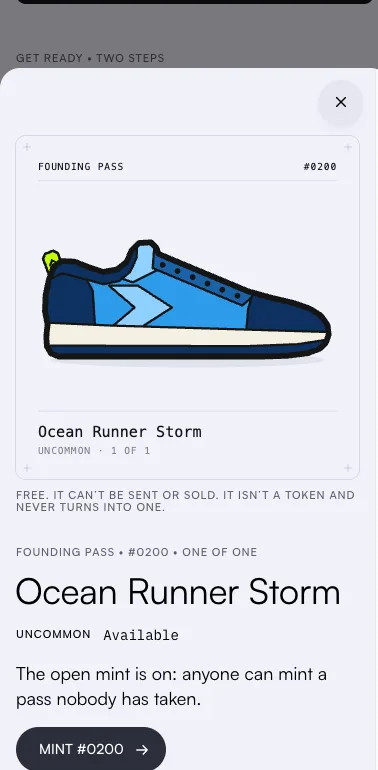
  • A pass open on a phone: Founding Pass #0200, Ocean Runner Storm, “The open mint is on: anyone can mint a pass nobody has taken.” and a Mint #0200 button.
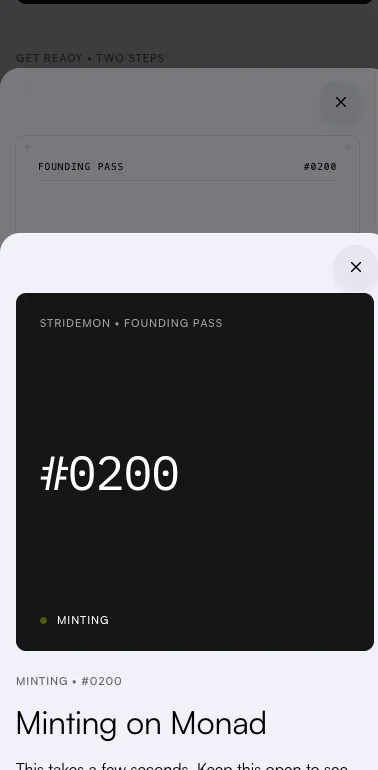
  • Minting on Monad: a dark card with #0200 and “Minting”, and “This takes a few seconds. Keep this open to see your founder number.”
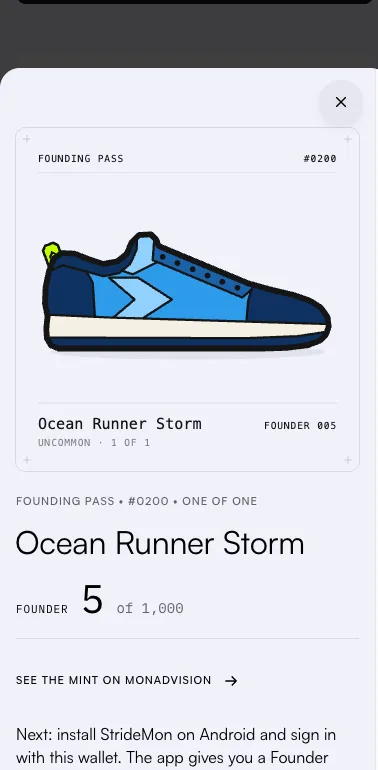
  • The minted pass: Ocean Runner Storm, Founder 5 of 1,000, with a link to see the mint on MonadVision.

Get the app

  1. 1.On your Android phone, tap Get the app after your mint, or the link below. It downloads the StrideMon app.
  2. 2.Open the downloaded file. If Android asks, allow installs from your browser.
  3. 3.Open StrideMon.

Android may say the app isn’t from Google Play. That’s expected for this test build.

Sign in with the same wallet

The app knows you’re a founder by the wallet that holds your pass.

  1. 1.In the app, tap Connect wallet and pick MetaMask.
  2. 2.In MetaMask, pick the account that holds your pass, with Monad Testnet turned on, and approve.
  3. 3.Back in the app, tap Sign to verify it’s you, and approve the message. It’s free.
  4. 4.The app finds your pass and mints your Founder Sneaker. It takes a few seconds.

The app shows the address you signed in with. If it says you have no pass, you’re probably on another account: sign out and sign in with the one you minted with.

  • StrideMon welcome screen: the headline “Walk. Earn. Upgrade.”, a line on how the game works, and a Connect wallet button.

Your first walk

  1. 1.On Home, tap Start a run. Allow location, so the app can count your minutes.
  2. 2.Walk or run. Minutes faster than 20 km/h don’t count, so no driving.
  3. 3.Tap Stop. Your STRIDE arrives on Monad a few seconds later.
  4. 4.Your first walk laces your pass and your Founder Sneaker. Both pictures change.
  • StrideMon Home screen: Sneaker #0002’s on-chain picture at level 1 with durability 99, efficiency 10, energy 7 of 10 with the next point in 27 minutes, and a balance of 30 STRIDE.
  • Active run screen on black: 2:14 elapsed, 166 m walked at 3.9 km/h, 8 of 10 energy left, an estimated reward of 10 STRIDE, and a STOP button.

Plain answers

What’s free?

Everything. The pass, the Founder Sneaker and the app are free. StrideMon pays the gas, and gives new players a little test MON. You never pay anything.

What does “can’t be sent or sold” mean?

Your pass and your Founder Sneaker stay in the wallet you minted with. Nobody can buy them, and you can’t move them to another wallet yourself.

The pass isn’t a token and never turns into one. If you lose that wallet, support can move both for you.

Why do you need my email?

To keep it to one pass per person, and so you can prove the pass is yours if you lose your wallet.

We send a code when you check your email, and one email when the waitlist window opens. Nothing else.

Which wallet should I use?

The one you’ll use in the app. The app knows you’re a founder by the wallet that holds your pass. MetaMask works on Android and as a laptop extension.

Is STRIDE worth money?

No. STRIDE is a test token on Monad Testnet, and it has no monetary value. You earn it by walking and spend it on your Sneaker.

What does “laced” mean?

Your first walk in the app laces your pass and your Founder Sneaker: the laces go in, and the card says LACED. It’s only for looks.

What happens after all 1,000 are minted?

No new passes, ever. StrideMon opens to everyone with a free normal Sneaker. If they aren’t all minted, it opens on the last date in the schedule anyway. Founders keep their pass and Founder Sneaker.

When something goes wrong

Your email

The code didn’t arrive.

Look in spam and promotions for an email from hello@stridemon.xyz. It can take a minute.

Check your email for a typo. You can ask for a new code after a minute, and only the newest code works.

The code doesn’t work.

Use the code in the newest email: a new code stops the old one working.

A code works for 10 minutes and 5 tries. After that, ask for a new one and type it carefully.

The robot check fails or won’t load.

It’s Cloudflare Turnstile, and it keeps bots from using up the mint. Wait for it to reload, then try again.

If it never shows, a content blocker may be stopping it. Allow stridemon.xyz or try another browser, then reload the page.

“Your email check ran out” or “Your sign-in ended”.

An email check lasts 6 hours. Check your email again: it takes a minute.

A sign-in also ends after a while. Sign in with your wallet again. It’s free.

Your wallet

I don’t have a wallet, or none is connected.

Install MetaMask first. It’s free and takes a few minutes. Then tap Connect wallet and pick it.

When your wallet asks to add or switch to Monad Testnet, say yes. It’s free.

The wallet part of the page doesn’t load.

Check your connection, then reload the page. Your favourites and email check stay.

If it still doesn’t load, a content blocker may be stopping it. Allow stridemon.xyz or try another browser.

My wallet doesn’t answer.

Open MetaMask and make sure it’s unlocked. On a phone, switch to MetaMask, look for the request, then come back.

Still nothing? Tap Use another wallet and connect again.

Signing in didn’t work.

Maybe you said no in your wallet, the request ran out (it lasts 5 minutes), or the signature didn’t check out. Signing in again is free and sends nothing.

If it keeps failing, disconnect your wallet and connect it again, or try MetaMask.

My wallet won’t switch to Monad Testnet.

Add Monad Testnet by hand, then switch to it. The guide has a one-tap button and the details.

On the website you can sign in and mint without it. The app needs it.

The mint

Minting hasn’t opened yet.

The schedule on the Founding Pass page shows when it opens. Meanwhile, heart the passes you like, and join the waitlist to mint 48 hours before everyone else.

“Right now, only the waitlist can mint.”

For the first 48 hours, only emails that joined the waitlist before the window opened can mint. Joining now doesn’t get you in.

Anyone can mint when the open mint starts. Add a reminder, and heart your favourites so they’re easy to find. Joined with another email? Check that one instead.

Someone minted the pass I wanted.

Each pass exists once, and the first mint wins. Nothing was minted for you.

You see three similar passes nobody has yet. One tap mints one.

My mint is slow, or the page lost touch.

Mints go one after another, and yours is held for you in the queue. Nothing is lost.

Keep the page open, or come back later in the same browser: the page picks your mint up again. Check your connection if it says it lost touch.

The mint didn’t go through.

Nothing was minted and nothing was charged, so you can try again. If it keeps happening, write to us.

It says I already have a pass.

It’s one pass per email and one per wallet. The page shows the pass you already hold.

Your next step is the app: sign in with the wallet that holds it. Lost that wallet? Support can move your pass.

All 1,000 are minted, or minting has closed.

No new passes, ever. StrideMon is open to everyone now: get the app and sign in for a free Sneaker.

“Too many tries.”

Too many requests came from your connection in a short time. Wait a few minutes, then try again.

“We can’t reach StrideMon” or “Something went wrong”.

Nothing was minted or lost. Check your connection and try again in a minute.

If it keeps happening, it’s probably on our side. Write to us, and say what you were doing.

The app

The app says “Mint a Founding Pass to get in early”.

Right now, only founders can play. The app looks for a pass in the wallet you signed in with.

Minted already? Check that the address the app shows is the wallet you minted with. If not, tap Sign out and sign in with that one.

Just minted? Tap I’ve minted my pass. A new pass can take a few seconds to show.

No pass yet? Tap See the Founding Passes. The app opens to everyone when all 1,000 are minted, or on the last date in the schedule.

The app can’t connect my wallet.

Most often, Monad Testnet isn’t turned on in MetaMask, so MetaMask shares no account.

  1. 1.In MetaMask, add and turn on Monad Testnet.
  2. 2.Clear the app’s data: Android Settings → Apps → StrideMon → Storage → Clear data.
  3. 3.Open StrideMon and connect again.

Every wallet request fails in the app.

This happens when the app was closed while MetaMask was asking you something. Nothing reached Monad.

Go to Profile, tap Sign out, then sign in again.

“Your sign-in has expired.”

Go to Profile, tap Sign out, then sign in again with the same wallet.

My Founder Sneaker, or my free Sneaker, isn’t arriving.

It usually takes a few seconds. If the app says it couldn’t request or mint it, tap Try again or Check again: nothing was charged.

If the app stays on that screen for more than a few minutes, write to us with your wallet address.

“Couldn’t read … from Monad.”

The app reads your pass and Sneaker straight from Monad Testnet, which is sometimes slow. Check your connection and tap Try again.

“StrideMon is paused for maintenance.”

Starting a run, repairs and upgrades are off for a short while. Everything you own is safe, and anything waiting goes through by itself when the game is back.

Lost your wallet?

If you lose the wallet that holds your pass (a lost phone and no Secret Recovery Phrase, say), support can move your pass and your Founder Sneaker to a new wallet. We do it by hand, and it’s the one way a pass ever moves.

They keep everything: the design, the founder number, the frame, laced or not, and the Sneaker’s level and stats.

  1. 1.Make a new wallet. It can’t already hold a Founding Pass.
  2. 2.Write to yashmittalmm@gmail.com from the email you minted with. Send your pass number (like #0137) and the new wallet’s address.
  3. 3.We reply with a 6-digit code to that email. Send it back, so we know the email is yours.
  4. 4.We move your pass and Founder Sneaker, usually within two days, and tell you when it’s done. Then sign in to the app with the new wallet.

Never send your Secret Recovery Phrase or password. We’ll never ask for them.

Contact

Write to us. A real person reads every email.

yashmittalmm@gmail.com

Help us help you: include

  • what you were doing
  • the words on the screen, or a screenshot
  • your wallet address (it starts with 0x and is safe to share)
  • your pass number, if you have one
  • your phone or browser

Never send your Secret Recovery Phrase or password. We’ll never ask for them.

Or ask on X:

@stridemon